SkyReels V2: The Most Powerful AI Video Generator for Long-Form Cinematic Filmmaking
In just the past year, the world of AI filmmaking has gone from futuristic concept to everyday creative reality. We’ve watched as text-to-video tools evolved from blurry experimental clips into powerful engines capable of producing short cinematic sequences with real emotion and style. But despite these advancements, nearly every platform has hit the same wall: duration limits, generic visuals, and a lack of directorial control.
That’s where SkyReels V2 steps in – not just as an upgrade, but as a complete redefinition of what’s possible. It’s the first open-source, cinema-grade AI video generator that allows for up to 30 seconds of continuous storytelling, powered by a new architecture built for filmmakers. With features like frame-by-frame prompt control, camera direction, shot extension, and built-in tools for lip sync, music, sound effects, and visual style training – this isn’t just an AI model. It’s a fully integrated AI filmmaking platform.
So why does this update matter? Because skyreelsv2 infinitelength film generative model finally gives creators the tools to move beyond 5-second loops and into real visual storytelling. Whether you’re a director experimenting with shot composition, a video creator producing AI reels, or a brand prototyping cinematic ads – SkyReels V2 offers complete scene control and cinematic quality in one seamless pipeline.
This guide is for filmmakers, creatives, and content producers who want to get hands-on with SkyReels ai V2 and create stunning, long-form AI videos – shot by shot, frame by frame.
What Makes SkyReels V2 Different
30-Second Video Generation
SkyReels is the first and only open-source model to support 30-second cinematic videos. This opens the door to storytelling with real pacing, buildup, and drama.
Extension Ready
Need even more? V2 supports semantic chaining, allowing you to extend scenes into longer narratives using multi-shot control. It’s the beginning of true AI film sequences.
Cinema-Grade Control
You’re not just describing a scene – you’re directing it. With frame-by-frame language scripting, character guidance, and support for 12 pro camera movement styles, SkyReels lets you choreograph every shot like a real DOP.
Key Features of SkyReels V2
As the first open-source, cinema-grade AI video model with support for infinite-length video generation, SkyReels V2 introduces a number of groundbreaking features that elevate it far beyond traditional AI video tools. These capabilities make SkyReels AI not just a creative assistant, but a full filmmaking engine – capable of producing rich, coherent, and visually expressive video content with professional depth.
Infinite-Length Film Generation
SkyReels V2 is powered by the world’s first infinite-length film generative model, built on a cutting-edge Diffusion Forcing framework. Unlike typical AI tools limited to 5–10 seconds of video, SkyReels can generate long-form video content with no strict duration cap.
This enables creators to build:
Scene-length sequences (30s or more)
Story arcs with multiple shots
Experimental or documentary-style films
The infinite duration capability is especially impactful for creators working on narrative content, music videos, or AI dramas, where temporal continuity and pacing are essential.
Multi-Modal Capabilities for Maximum Flexibility
SkyReels V2 supports both:
Text-to-Video (T2V) – describe your scene in cinematic language
Image-to-Video (I2V) – animate static frames with advanced motion control
It also integrates high-level control systems like:
Story Generation – translate plotlines into visuals
Camera Director AI – simulate real cinematography
SkyReels-A2 Engine – ensures multi-subject consistency and logical scene progression
These systems work together to give you frame-by-frame direction, multi-character interaction, and high narrative fidelity — all within one creative flow.
Cinematic Quality, Built on Real Film & TV Data
Trained on a massive dataset of professional film and television content, SkyReels ai V2 outputs cinema-grade visuals with:
Natural lighting and environmental realism
33 facial expressions and 400+ movement styles
Accurate actor positioning and scene blocking
High responsiveness to cinematic language prompts (e.g., “close-up,” “over-the-shoulder,” “tracking shot”)
This intelligence comes from SkyCaptioner-V1, a proprietary video captioning model that enables SkyReels to “understand” shot structure, mood, and direction with human-like accuracy.
SkyReels V2 is more than just the next version of an AI video tool – it’s a complete transformation of what’s possible in AI-powered filmmaking. To understand how far it goes, it’s worth looking at the leap from SkyReels V1 to V2.
In its first version, SkyReels already stood out by combining tools like scriptwriting, lip sync, and basic text-to-video in a unified interface. But like most AI video platforms, it was limited to short durations and relied heavily on pre-trained motion templates with minimal room for cinematic nuance.
SkyReels V2 changes everything.
At its core is the first open-source AI video generation model capable of 30-second cinema-grade outputs — a massive breakthrough in a space where most tools cap out at 5 to 10 seconds. Not only can you generate longer sequences, but SkyReels V2 also introduces semantic video control, allowing you to guide each shot with language that mirrors real cinematography: from dolly-ins to tracking shots, from lighting style to emotional tone.
Another game-changing addition is infinite video extension, meaning creators can chain multiple scenes together through coherent storyboards and visual continuity. This opens the door to short films, branded sequences, and AI drama projects that actually feel like they’re building momentum.
Perhaps most impressively, SkyReels V2 offers frame-by-frame shot direction – giving you control over camera placement, movement, and subject behavior in a way that feels less like prompting and more like directing.
This isn’t just an upgrade – it’s AI filmmaking rebuilt for real storytellers.
The wolves circle the woman in a slow, mesmerizing motion, their eyes locked onto her as their bodies weave through the mist like ghostly guardians. Her hand hovers mid-air, fingers lightly brushing through the energy between them, while her gown subtly ripples with their movement. The camera glides in a smooth arc around the scene, following the wolves’ motion before gently pushing in towards her face, capturing her deep, unspoken connection with the pack.
All-in-One AI Filmmaking Platform
SkyReels V2 isn’t just about video generation – it’s a complete AI filmmaking platform.
From scriptwriting and storyboarding to video creation, voice, music, sound effects, and editing, everything happens in one seamless interface:
Included AI Creation Tools:
AI Video Generator (Text-to-Video, Image-to-Video)
AI Drama Tool (script to storyboard to edit)
Lip Sync AI
Image Generator
LoRA Style Trainer
AI Sound Effects + Music Generator
Script-to-Shots Editor
Full Video Editor
No switching platforms. No messy handoffs. Just creativity – uninterrupted.
Creating Video with SkyReels V2: Text-to-video, Image-to-video)
At the heart of SkyReels V2 is its advanced AI Video Generator, which allows you to create cinema-grade videos either as single-shot clips or as part of a multi-shot storyboard. This flexibility makes it one of the most powerful tools currently available for AI filmmaking – whether you’re crafting a quick vertical reel or laying out a scene-by-scene short film.
You can choose between 5s, 10s, or 30s durations depending on your project’s needs. Unlike other tools that compress ideas into tiny, motion-heavy bursts, SkyReels V2 offers cinematic pacing, enabling atmosphere, subtle performance, and intentional movement.
Prompt Structure (from official guide)
SkyReels V2 uses a structured natural language prompt format designed to give filmmakers full control over visuals and motion. Here’s the recommended syntax:
Subject + Scene Description + Camera Movement + Lighting + (Optional: spect Ratio, Style Model)
Prompt Example (Structured):
A girl stands on a rooftop at dawn, soft breeze moving her hair, the camera slowly dollies in from behind. Natural lighting, shallow depth of field. – Aspect ratio: 16:9, Model: Stable
Each element of the prompt contributes directly to the output:
Subject & Setting: Who or what is in the scene and where
Scene Description: Mood, emotion, or physical detail
Camera Movement: Dolly, pan, handheld, etc.
Lighting: Time of day, softness, shadows, atmosphere
Tags/Modifiers: Use optional inputs like “vintage tone,” “LoRA: noir-style,” or “vertical format” to influence output
SkyReels ai V2 also allows the use of LoRA-trained styles, which apply custom visual aesthetics or motion pacing learned from your own footage. Combined with precise aspect ratio settings like 16:9, 2.35:1, or 9:16, you’re not just prompting an AI – you’re directing a scene.
Whether you’re building a moment or mapping an entire sequence, the AI Video Generator is where it all begins.
SkyReels V2 AI Video Generator: Complete Control from Prompt to Cinematic Motion
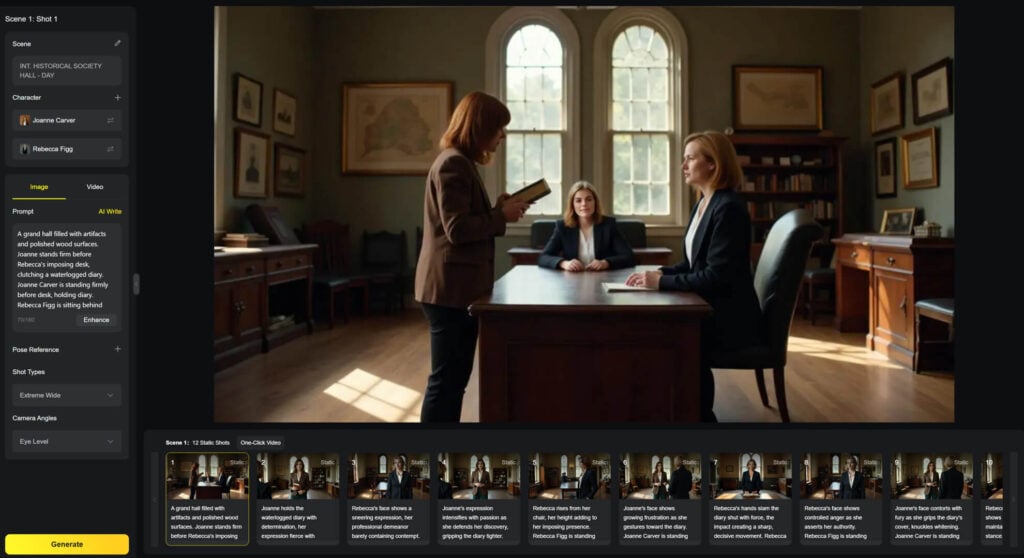
At the core of SkyReels V2 lies its most powerful feature – the AI Video Generator. Built for filmmakers, not casual content creators, this tool allows you to compose richly detailed cinematic scenes using natural language prompts, still images, or your own stylistic training data. Whether you’re animating from scratch with text, directing motion from an image, or maintaining consistency with subject references and visual effects, SkyReels gives you professional-grade control over every frame.
Text-to-Video: Compose a Scene with Cinematic Language
SkyReels V2 allows you to generate stunning AI videos using nothing more than a well-crafted prompt. You choose the duration (5s, 10s, or 30s), aspect ratio (16:9, or 9:16), and render mode (Stable, Auto), then describe the shot in natural language – the way a director might talk to a cinematographer.
Recommended prompt structure:Subject + Scene Description + Camera Movement + Lighting + (Optional: Tags, Aspect Ratio, Effect)
Example:
A young woman stands in an empty train station at dawn. Soft light pours through the windows. The camera slowly dollies forward as she turns to look at the camera. Aspect ratio: 16:9, Model: Stable, LoRA: soft-grain-vintage
With SkyReels’ deep video-language understanding, prompts like “over-the-shoulder,” “wide tracking shot,” or “dolly in with shallow focus” translate into actual camera behaviors – no post-editing needed.
Image-to-Video: Animate Still Frames into Cinematic Motion
SkyReels ai V2 takes still images and brings them to life through cinematic motion. This goes far beyond basic pan-and-zoom animation – SkyReels analyzes the visual composition and layers in realistic depth, timing, and camera choreography.
You can choose from several input modes:
1. First Frame Animation
Upload a single image to define your starting look. Add a motion prompt (e.g. “walks away slowly, camera follows from behind”) to animate the scene. This is perfect for artistic AI images, character portraits, or establishing shots where visual style matters.
2. First and Last Frame
This option lets you upload two images – one for the beginning and one for the end of the clip. SkyReels V2 intelligently interpolates motion between them, maintaining realism and emotion. Ideal for storytelling moments that include subtle changes in movement, lighting, or expression.
3. Subject Reference
Subject Reference allows you to animate specific characters, objects, or environments with visual continuity. Upload 1 to 4 images of your subject (a person, animal, object, or scene), and describe their interaction or movement.
Example Workflow:
Upload: a wizard, a pumpkin, a spaceship
Describe the action: “The wizard turns the pumpkin into a spaceship. The camera circles around them as magic fills the air.”
Generate your video.
Effect Options: Ready-Made and Custom LoRA
SkyReels V2 offers both predefined cinematic effects and support for LoRA-based custom styles.
Built-in effects: Choose from curated cinematic presets (e.g., “handheld,” “vintage grain,” “film noir”).
Custom LoRA styles: Train SkyReels on your own visual data – such as branded footage, signature looks, or motion studies – and apply it to your generations.
Example use cases:
Reproduce a 1970s documentary vibe
Maintain a consistent branded style across content
Animate scenes to match a specific cinematic language
Script-to-Storyboard with the AI Drama Tool
One of the standout features of SkyReels V2 is the AI Drama Tool, a complete pipeline that transforms written scripts into fully visualized, camera-ready scenes. Designed with filmmakers, writers, and creative teams in mind, this tool bridges the gap between words and moving images – making it possible to go from script to storyboard, then straight to rendered video, all within one platform.
At its core, the AI Drama Tool allows you to upload or paste a script, whether it’s a short film, a commercial, or a series of connected scenes. SkyReels automatically analyzes the structure of your script – identifying key characters, actions, dialogue, and transitions – and then begins to generate visual storyboards that match your narrative flow.
What makes this tool uniquely powerful is how much creative control you retain during the process. You can:
Assign distinct visual styles to characters using reference images or LoRA-trained effects
Customize character expressions, moods, and positions within each frame
Adjust backgrounds, lighting, and environmental details to fit your tone
Choose aspect ratios (16:9, or 9:16) depending on your delivery format
Once your script is interpreted and visualized, SkyReels automatically splits scenes into shots, creating a frame-by-frame storyboard with suggested camera angles and movements. Each shot is editable – allowing you to fine-tune pacing, focus, or mood before final generation.
And here’s the real magic: this is more than just a visual aid. Your storyboard connects directly to the AI Video Generator, meaning you can render full cinematic sequences shot by shot, without leaving the platform.
Audio Features – Voice, Music & SFX
In cinematic storytelling, visuals are only half the equation – sound is what gives your scenes emotional depth, spatial realism, and narrative rhythm. That’s why SkyReels V2 includes a robust suite of AI-powered audio tools, fully integrated into its end-to-end filmmaking pipeline. From dialogue and narration to ambient soundscapes and original music, you can create, control, and synchronize sound without leaving the platform.
AI Text-to-Speech
SkyReels AI Text-to-Speech engine allows you to bring your characters and narrators to life with natural, expressive voiceovers. You can choose from a wide range of voice styles, genders, accents, and even emotional tones to match your scene’s intent – whether it’s serious, comedic, calm, or suspenseful.
Every generated voice can be synced directly with your video’s lip movements, allowing for seamless integration in animated monologues, character dialogue, or voiceover scenes. The tool supports multilingual output, making it suitable for global creators and brands working in multiple languages.
Text to Music
Need a soundtrack that fits your story? SkyReels V2 can generate original background music based on a simple description of tone, emotion, and genre.
Example Prompt:
“80s synthwave, melancholic tone, slow tempo”
→ Outputs a moody retro score perfect for a nostalgic sci-fi montage or a lonely cityscape scene.
This feature is especially useful for creators who want copyright-safe, style-matching music without digging through stock libraries.
AI Sound Effects
To complete your audio mix, SkyReels also includes an AI sound effects generator. You simply describe the sound environment you need – such as “soft rain on glass,” “forest breeze,” or “footsteps on gravel” – and the system generates audio that fits the mood and timing of your video.
Perfect for building atmosphere, intensifying tension, or layering realism, AI SFX are especially useful in scenes where background noise adds narrative depth.
Lip Sync Tool – Animate Dialogue with Real Voices
One of the most impressive features in SkyReels V2 is the Lip Sync Tool, which allows you to bring still images or silent video clips to life with accurate, AI-generated mouth movement that matches any voice recording.
The process is simple: upload an image or video of a person (or character), add a voice clip – either your own recording or one generated using the platform’s Text-to-Speech tool – and SkyReels will automatically analyze the audio and animate the subject’s lips in perfect sync. The result is a natural-looking, expressive performance that can be dropped directly into your AI-generated scenes or used as standalone content.
This tool is ideal for:
AI-generated vlogs or influencer content
Character interviews in documentaries or mockumentaries
Story-driven monologues in short films
Personalized messages or virtual avatars for branding or education
You can also combine the Lip Sync Tool with SkyReels’ Subject Reference or LoRA style effects, maintaining consistent visuals while animating new lines of dialogue across multiple clips.
Whether you’re working on a dramatic short, an animated explainer, or a talking-head narrative, SkyReels’ Lip Sync Tool gives your characters a voice – and makes them truly come alive on screen.
Train Effect – LoRA-Based Motion Training for Actor Movement
In SkyReels V2, the Train Effect feature gives filmmakers something few AI platforms have ever offered: the ability to train custom motion patterns for characters or animated subjects. Unlike traditional LoRA models that focus on visual style or color grading, this tool is specifically designed to learn and replicate the unique movements found in your footage – whether it’s an actor’s walking style, an animated gesture, or a stylized action sequence.
How It Works: Learn Motion, Not Just Looks
Step 1 – Upload Training Footage
Provide 2–10 short clips (typically 3–10 seconds each) that demonstrate consistent motion. These could be:
A specific walking style (e.g. slow, limping, dramatic stride)
A repeating gesture (e.g. head turns, hand movements)
A unique animated sequence (e.g. stylized martial arts, robotic dance)
The visual style of the footage can vary – what matters most is that the motion is consistent across all uploaded files.
Step 2 – Start Training
Once uploaded, SkyReels’ AI begins analyzing the movement rhythm, posture transitions, speed, and interaction dynamics. After training, the system produces a custom motion module you can apply to new videos – enabling characters to move in your trained style across any scene.
Expert Tips for Writing Better SkyReels V2 Prompts
Writing effective prompts in SkyReels V2 is less like giving instructions to a machine – and more like directing a cinematographer on set. The platform understands shot language, motion intent, and cinematic rhythm, but only if your prompt is clear, structured, and intentional. Below are expert tips I’ve developed through daily use of SkyReels in professional AI filmmaking workflows.
Start with a Clear Subject and Emotion
Begin every prompt by identifying the main subject and their emotional state or action. Think visually: “A nervous boy waits at the edge of the stage,” or “An old woman smiles softly as she watches the sunrise.” Emotion sets the tone – and the AI will interpret body language and facial expression accordingly.
Always Define Camera Movement
Camera behavior is one of SkyReels V2’s strongest features — but you need to be specific. Avoid vague phrasing like “camera shows” or “we see.” Instead, use real cinematic terms:
“Dolly in slowly”
“Tracking shot from right to left”
“Over-the-shoulder angle, handheld motion”
Add Color, Lighting, and Atmosphere
These details enhance realism and emotional resonance. Include:
Time of day: “golden hour,” “nightfall,” “harsh midday sun”
Lighting quality: “soft rim light,” “deep shadows,” “high contrast”
Mood: “fog rolls in,” “warm glow,” “cold sterile room”
Use Aspect Ratios and Style Tags
Specify format:
“Aspect ratio: 16:9” for cinematic
“9:16” for reels or vertical storytelling
Add tags like “LoRA: handheld-grain,” “vintage tone,” or “black-and-white noir” for added style control.
By treating your prompt like a line from a director’s shot list, you give SkyReels V2 exactly what it needs to generate visuals with intent, coherence, and cinematic impact.
Final Thoughts: Why SkyReels V2 Is a Very Promising AI Filmmaking Tool?
SkyReels V2 – worlds first infinitelength movie generation – represents a pivotal shift in the evolution of AI video tools – it’s the first platform to successfully combine cinematic control, open-source accessibility, and infinite-duration video generation into one seamless, filmmaker-focused ecosystem.
While most AI video generators remain confined to 4–10 second clips with minimal narrative structure, SkyReels V2 breaks those limits with up to 30-second generation, support for multi-shot storyboards, and frame-by-frame language direction. From motion training with LoRA to lip-sync accuracy and character consistency, the system gives filmmakers the control they need to compose scenes with precision and intention.
Compare it with Kling AI 2.0 in our guide.